SaaS User Lifecycle Management: How to Reduce Security Risk
Aryan Malik · August 25, 2026
SaaS access can become a security risk when employees change roles or leave without their application permissions being updated. Learn how SaaS user lifecycle management helps keep access aligned with current roles, improve visibility, and reduce unnecessary security risk.
A user gets access to six SaaS applications when they join the company. Eight months later, they move to another team and only need three of them. Nobody removes the other three. A year later, they leave, their main corporate account gets disabled, and two of those SaaS accounts are still sitting there.
That's how SaaS access turns into a security problem. The issue isn't usually granting access in the first place. It's keeping that access aligned with what the person actually does as their role changes, and removing it when they no longer need it.
NIST's identity and access management guidance explicitly calls for access to be reviewed when employees change roles and for system access and credentials to be disabled or revoked when employment ends.
What SaaS user lifecycle management actually means
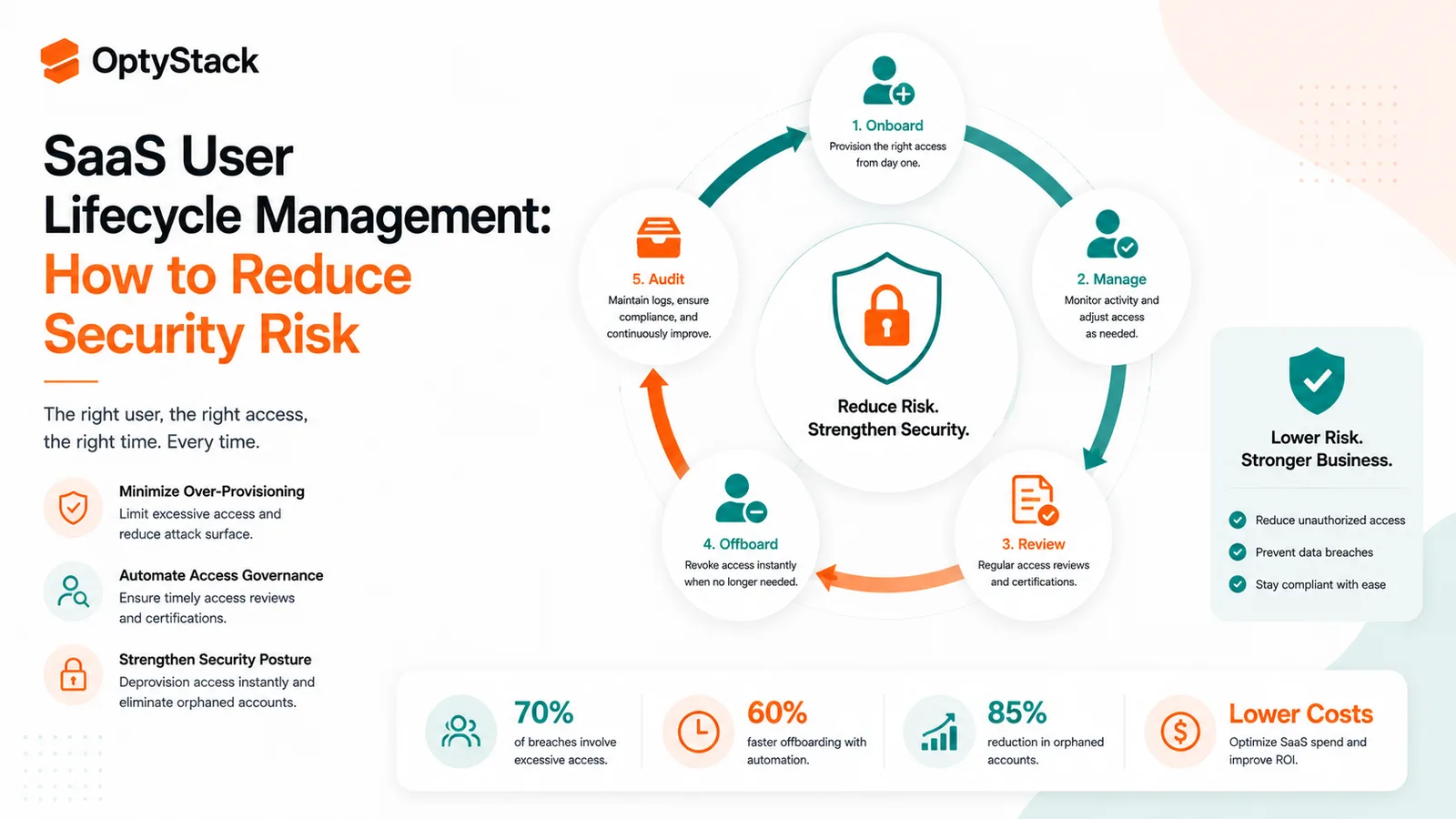
SaaS user lifecycle management is the process of managing application access throughout an employee's time at a company.
There are three events worth paying attention to:
Joiner: a new employee gets access to the applications required for their role.
Mover: an employee changes teams, responsibilities, or roles, so their existing access needs to be reviewed.
Leaver: an employee leaves and their unnecessary SaaS access needs to be removed.
The framework is simple. The difficult part is that the applications sitting underneath it rarely are.
Some SaaS apps are connected to SSO. Others have separate accounts and admin consoles. Some support automated provisioning and deprovisioning, while others still require changes inside the application itself. That leaves plenty of room for an employee's HR record to be correct while their SaaS access is still based on an old job.
Why SaaS user lifecycle management matters
Employees change roles, but their access can stay the same
A role change may take one update in the HR system. The employee's application permissions can remain untouched for months.
Someone moves from Sales into Finance. Their new role might not require access to sales workspaces, customer records, or sales-specific applications, but those permissions don't necessarily disappear just because their job title changed.
NIST specifically recommends reviewing and modifying access when someone is transferred or reassigned to a different position.
That makes a mover event more than an HR update. It's also an access review.
Offboarding can miss accounts outside the main identity system
Disabling an employee's corporate account is an important part of offboarding, but it isn't always the end of the process.
An employee may have a direct account in a SaaS application, a separate admin profile, application-specific permissions, or access that was created outside the normal IT workflow. NIST's identity-management examples show termination workflows that remove access across multiple connected systems rather than relying on a single central account change.
The question after an employee leaves shouldn't just be whether their primary account is disabled.
It should be whether the SaaS access attached to that person has actually been dealt with.
Inactive access creates another blind spot
Someone doesn't have to use an application for their account to remain active.
That matters because an active seat can represent both an access path and an ongoing software cost. OptyStack's current license-management approach, for example, connects identity and usage signals to help identify inactive users, zombie accounts, and seats that need review.
An inactive account isn't automatically a problem. Some applications are used infrequently by design. But when inactivity lines up with a role change, departure, or lack of a clear owner, it's a good reason to take another look.
What a practical SaaS lifecycle process looks like
Start with the employee record
HR should be the source for employment status and role changes. That information needs to reach the people and systems responsible for application access.
When a new employee joins, give them the applications their role actually requires. Avoid copying another employee's access wholesale just because their titles look similar.
Starting with the right access is easier than cleaning up excessive access later.
Treat role changes as real access events
Offboarding gets attention because the employee is leaving. Internal moves are easier to miss because they're still on the payroll.
That doesn't make them less important.
When someone changes teams, review both sides of the change: what they need in the new role and what they no longer need from the old one. NIST's mover workflow examples specifically show access associated with the previous role being removed while new role-based access is provisioned.
This matters even more when the employee moves between teams with different data, systems, or privileges.
Make offboarding broader than SSO
When someone leaves, review more than the primary identity account.
Look at their SaaS applications, privileged permissions, direct accounts, shared access, and application-specific credentials where relevant. The exact checklist will vary by company, but the basic rule is straightforward: access should be removed when the business need ends unless there's a documented reason to keep it.
NIST's guidance specifically calls for disabling system access and revoking associated credentials after termination.
Compare access with actual usage
An access list tells you what a person can use. Usage data tells you what they're actually using.
Both are useful.
An employee might have six applications assigned but regularly use only two. That doesn't automatically mean the other four should be removed. One may be needed for quarterly reporting. Another might be used only during a specific process.
Usage simply gives IT another signal to work with instead of making the decision from the access list alone.
Keep track of what changed
Access decisions should be explainable.
Teams should be able to tell when access was granted, changed, or removed and what triggered the change. NIST's identity-management examples use workflow and audit mechanisms so access changes can be tracked across systems.
That helps during security investigations, but it also makes ordinary access reviews much easier.
How to reduce lifecycle risk without slowing teams down
The best process isn't the one with the most approval steps.
Use role-based access where it makes sense for repeatable job functions. Automate routine provisioning and deprovisioning where your identity and SaaS systems support it. Give privileged and sensitive applications more frequent reviews than lower-risk tools.
Most importantly, review access when something changes.
If an employee moves teams this week, that's when their access should be checked. Waiting for the next quarterly or annual review gives old permissions more time to become part of the background.
Where OptyStack fits
The difficult part of SaaS user lifecycle management is often visibility. Teams can have employee records in HR, identities in an IdP, licenses in procurement, and user accounts spread across dozens of SaaS applications.
OptyStack brings those signals together. Its SaaS user identity and access capabilities correlate user identities across applications, with SSO integration and user access timeline tracking so teams can see who has access to what and how those relationships change over time.
OptyStack also connects identity with usage and license information. That helps teams spot inactive users, over-provisioned seats, and accounts that deserve review instead of checking every application separately. Its license-management workflows map seats to people and HR/IdP records, which supports reviews around offboarding and role changes.
The value is the visibility: one place to understand the people, applications, access, and licenses that make up the SaaS environment.
Frequently asked questions
What is SaaS user lifecycle management?
SaaS user lifecycle management is the process of managing employee access to SaaS applications as people join the company, change roles, and leave.
Why is SaaS lifecycle management a security issue?
Because access should change when an employee's responsibilities change. Without timely reviews and deprovisioning, people can retain access they no longer need, while former employees can remain associated with SaaS accounts. NIST treats termination and transfer access changes as part of identity and access management.
What is the joiner-mover-leaver model?
It treats onboarding, internal role changes, and offboarding as separate access-management events. Each one can trigger a different set of access changes.
How does lifecycle management help with SaaS license costs?
Connecting identity and usage data makes it easier to find seats assigned to inactive users, people who changed roles, and accounts that may no longer be needed. Those seats can then be reviewed before the next billing cycle or renewal.
Can SaaS lifecycle management be automated?
Parts of the process can be automated through HR systems, identity providers, provisioning tools, and SaaS management platforms. NIST's identity-management examples demonstrate workflows that use HR events to trigger access changes for role changes and terminations.
Keep SaaS access tied to the people who need it
SaaS access is easy to grant and surprisingly easy to forget.
People move teams. Their responsibilities change. Applications get added and replaced. Eventually, employees leave. The access attached to those changes needs to move with them.
That is what lifecycle management is really about: keeping SaaS access current instead of letting old permissions quietly accumulate across the stack.
See who has access to what across your SaaS environment. Start free with OptyStack.