AI Security Checklist for Businesses: How to Assess AI Features in SaaS Tools
Satvik Bansal · October 29, 2026
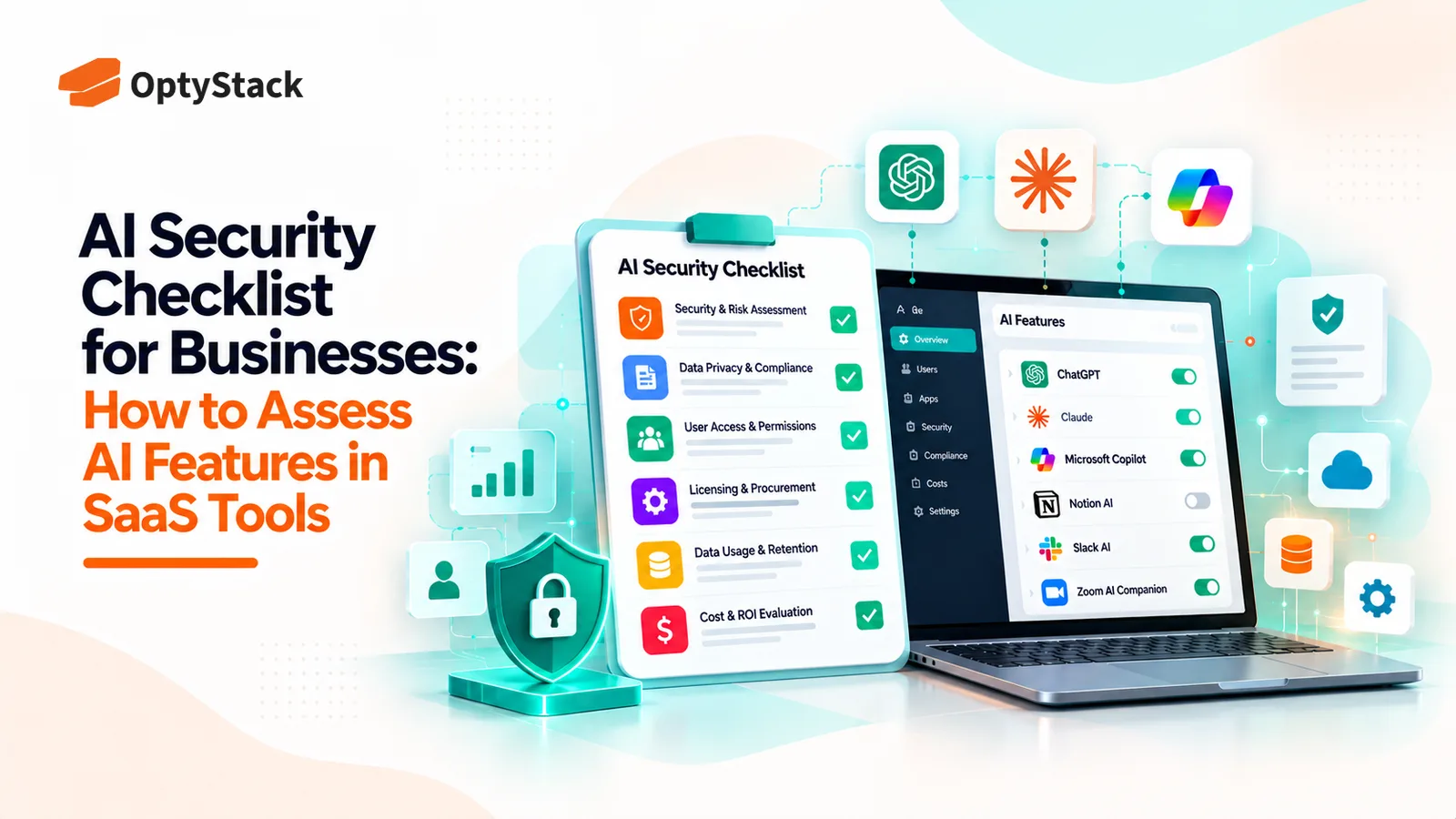
AI features are appearing inside the SaaS tools businesses already use. Before enabling them, review what data they can access, how vendors process information, which controls are available, and whether the feature introduces new costs or risks.
AI is becoming part of the software businesses already use. Project management platforms can summarize work, CRM systems can generate customer insights, and collaboration tools can draft messages or search company knowledge using AI.
These features can save time. But enabling them can also change how a SaaS application accesses, processes, and stores company information.
The challenge is that a tool may already be approved by IT, procurement, and security teams. Its new AI capability, however, may introduce different data-processing practices, permissions, terms, or costs.
That is why businesses need to assess AI features separately instead of assuming that approval of the original application covers every new capability.
This AI security checklist helps IT, security, procurement, and SaaS management teams evaluate AI features before enabling them across the organization.
Why Existing SaaS Approvals May Not Be Enough
Traditional SaaS reviews typically examine a vendor's security controls, privacy practices, contractual terms, integrations, and business value. Those checks remain important when AI capabilities are introduced.
However, an AI feature may process information in a different way from the rest of the application. It might send prompts and relevant records to an additional service, generate summaries from internal documents, or use connected data to answer employee questions.
The implications depend on the specific feature and vendor configuration. Not every AI feature uses customer data for model training, and not every feature sends information to an external model provider. Businesses need to verify what actually happens rather than assume either outcome.
The National Institute of Standards and Technology's AI Risk Management Framework provides a useful foundation for identifying, assessing, and managing AI-related risks.
For SaaS teams, the practical starting point is straightforward: understand what the feature does, what information it can access, and which controls govern its use.
1. Understand What the AI Feature Actually Does
Before reviewing security settings, identify the feature's purpose and scope.
A tool that generates a meeting summary may present different risks from one that searches company documents, analyzes customer records, or recommends actions based on connected business data.
Ask the vendor and internal owner:
What specific task does the AI feature perform?
Which business problem is it intended to solve?
Is the feature enabled by default, optional, or included in an existing subscription?
Which employees or teams will use it?
Does it access only information provided in a prompt, or can it retrieve information from connected records and applications?
Does it take actions automatically, or does it only generate recommendations and content?
Document the answers before enabling the feature.
This step also helps teams avoid approving broad AI capabilities when employees only need a narrow function. Start with the minimum functionality required to achieve the intended business outcome.
2. Review Data Access, Privacy, and Retention
Data handling is one of the most important parts of an AI security review.
An AI feature might process customer information, employee records, internal documents, source code, financial information, or confidential business plans. The risk depends on the sensitivity of that data and how the vendor handles it.
Use these questions to guide the review:
What data does the feature collect or process?
Does it access information already stored in the application?
Is data sent to another model provider or subprocessor?
Is customer data used to train or improve models? If so, under what conditions?
How long are prompts, outputs, and associated records retained?
Can the organization request deletion?
Where is the information processed and stored?
Does the vendor explain how data is protected and isolated between customers?
Do not rely solely on a general privacy policy. Review the relevant AI terms, data-processing agreement, security documentation, and product-specific settings.
If the vendor cannot clearly explain its data practices, treat that uncertainty as a risk that needs to be resolved before rollout.
3. Check Permissions and Connected Data
AI features can make information easier to discover and summarize. That convenience becomes a security concern if the underlying permissions are too broad or incorrectly configured.
For example, an AI assistant that searches company documents should not give an employee access to confidential material that the employee could not otherwise view.
Check whether the feature:
Respects existing user and administrator permissions.
Uses role-based access controls where available.
Can access connected applications, shared drives, email, or customer records.
Supports restrictions on sensitive data or high-risk user groups.
Logs relevant access and activity.
Allows administrators to disable access for specific users or teams.
Pay particular attention to integrations and delegated permissions. An AI feature may rely on an existing connection to retrieve information, so reviewing the application's permissions alone may not tell the whole story.
Before a wider launch, test the feature with representative user roles and realistic data. Confirm that it returns only information those users are authorized to access.
4. Evaluate the Vendor's AI Security Controls
A vendor's general security certification can be useful, but it does not automatically answer every question about a particular AI capability.
Review the controls available for the feature itself, including:
Administrative control: Can the feature be enabled or disabled centrally?
Identity and access: Does it support the organization's authentication and access policies?
Logging and monitoring: Can administrators investigate relevant usage and security events?
Data protection: Are appropriate encryption and data-handling controls documented?
Incident response: Does the vendor explain how AI-related security incidents are handled?
Third-party dependencies: Are relevant model providers and subprocessors disclosed?
Risk management: Does the vendor document how it evaluates and addresses AI-related risks?
Where relevant, ask how the vendor addresses risks such as prompt injection, unintended data disclosure, inaccurate outputs, and inappropriate actions initiated through connected systems.
The NIST Generative AI Profile offers additional guidance for organizations evaluating risks associated with generative AI.
The goal is not to demand identical controls from every vendor. It is to determine whether the controls are proportionate to the feature's access, intended use, and potential impact.
5. Review Contract Terms and Additional Costs
AI capabilities can change the commercial relationship with a SaaS vendor, even when the core application is already approved.
Some features are included in an existing plan. Others require a higher subscription tier, additional credits, separate usage charges, or a new contractual agreement.
Before approval, confirm:
Is the feature included in the current subscription?
Are there usage limits, credit allowances, or overage charges?
Does enabling it trigger an automatic upgrade or paid add-on?
Are AI-specific data-processing terms available?
Can the vendor change its AI providers or data practices, and how will customers be notified?
Can the organization disable the feature or terminate its use without disrupting the main application?
Are there restrictions on using AI-generated outputs for business purposes?
Record the pricing model and the person responsible for monitoring usage. A feature that appears inexpensive during a small pilot may cost more when adopted across multiple departments.
Procurement and IT should also confirm that the intended use complies with internal purchasing and data-handling policies.
6. Assess the Business Need Before Rolling It Out
Security approval should not be the only consideration. An AI feature also needs a clear purpose and a measurable benefit.
Ask the requesting team to explain what the feature will improve. It might reduce time spent summarizing meetings, help employees find information, or speed up routine work. These are potential benefits, not guaranteed outcomes.
Define how the organization will measure success before launching the feature.
For example, a pilot might measure time saved per task, employee adoption, output accuracy, user satisfaction, and the number of errors requiring manual correction.
Start with a limited group and non-sensitive or appropriately protected data. Establish who will review the results and who can stop the pilot if a security, privacy, quality, or cost issue emerges.
If the feature does not deliver a meaningful improvement, expanding access may not be justified.
7. Use a Simple AI Feature Risk Rating
A consistent rating process helps teams decide which requests need a routine review and which require additional scrutiny.
Use the following model as an internal starting point. It is a practical screening method, not an official NIST scoring standard.
Risk level | Typical indicators | Suggested action |
|---|---|---|
Low | Limited data access, clear vendor terms, no sensitive information, restricted use | Document the review and approve under existing policy |
Medium | Access to internal business data, additional integrations, unclear retention details, or moderate cost exposure | Request clarification, test controls, and obtain relevant stakeholder approval |
High | Sensitive or regulated data, broad cross-application access, unclear data use, significant autonomous actions, or unresolved security concerns | Pause enablement until the risks are reviewed and addressed |
Teams can score individual factors on a simple scale from 1 to 3:
1: Low concern with documented controls.
2: Moderate concern requiring additional checks.
3: High concern or unresolved uncertainty.
Assess data sensitivity, access scope, vendor transparency, security controls, and business impact separately. Use the scores to flag requests for review rather than treating the total as an automatic approval decision.
An unresolved high-impact issue should not be dismissed simply because the overall score is low.
8. AI Security Checklist Before Enablement
Use this checklist during the review of each AI feature.
Review area | Questions to resolve |
|---|---|
Business purpose | Is the use case specific and justified? |
Data handling | What information is processed, retained, or shared? |
Model training | Is company data used for training, and under what terms? |
Permissions | Does the feature respect existing access controls? |
Integrations | Which applications, records, and services can it access? |
Vendor security | Are relevant controls and subprocessors documented? |
Administration | Can access be restricted, monitored, and disabled? |
Compliance | Does the intended use align with internal requirements? |
Contracts | Are AI terms, usage limits, and pricing understood? |
Testing | Has the feature been tested with representative users and data? |
Ownership | Is a person or team accountable for the feature? |
Ongoing review | Is there a trigger for reassessment when the feature or terms change? |
Keep a record of the decision, evidence reviewed, identified risks, exceptions, and approval owner. This makes future reviews easier and helps the organization understand why a feature was approved.
9. Reassess AI Features as They Change
An approval should not be treated as permanent. SaaS vendors can introduce new capabilities, change subscription tiers, add integrations, update data-processing terms, or modify administrative controls.
Establish review triggers such as:
A major change to the feature's functionality or data access.
A new model provider or subprocessor.
Changes to data retention or training terms.
A change in the sensitivity of the data being processed.
A security incident or material vendor disclosure.
An increase in usage, costs, or the number of employees with access.
The review frequency should reflect the risk. A low-risk feature may fit into a regular vendor review, while a high-risk feature may need more frequent oversight.
Maintaining an inventory of AI-enabled SaaS features, their owners, approved use cases, and review dates gives IT, security, and procurement a clearer view of where AI is being used across the business.
Conclusion
AI features inside existing SaaS applications can create genuine productivity benefits, but they should not bypass the organization's normal security and procurement processes.
Before enabling a feature, confirm what it does, which data it can access, how the vendor processes that data, whether existing permissions remain effective, and what the feature will cost. Test the intended use case, document the decision, and reassess it when material changes occur.
The wider challenge is visibility. When different teams enable AI capabilities across multiple applications, organizations can lose track of which features are in use, who owns them, and whether they have been reviewed.
A consistent review process, supported by an accurate inventory of SaaS applications, owners, and usage, helps businesses make informed decisions without treating every new feature as an entirely separate procurement exercise.
Optystack helps organizations improve visibility into their SaaS environment, manage licenses, and keep track of renewals. Better visibility provides a stronger foundation for understanding the applications teams use and deciding where additional governance is needed.