SaaS Intake Management in : How to Control Software Requests Before They Become Shadow IT
Abhishek Sharma · October 28, 2026
New software requests can introduce security risks, duplicate tools, and unexpected costs. Learn how a structured SaaS intake management process helps IT teams evaluate requests, control software adoption, and improve visibility.
A new software request rarely looks like a problem. A marketing team wants an AI writing assistant, sales needs a prospecting platform, or HR wants a recruitment tool. Each request has a reasonable business purpose, and employees often want to start using the software as quickly as possible.
The challenge begins when these requests bypass IT, security, procurement, or finance. Teams may purchase overlapping subscriptions, share company data with unreviewed vendors, or continue paying for tools that nobody centrally manages.
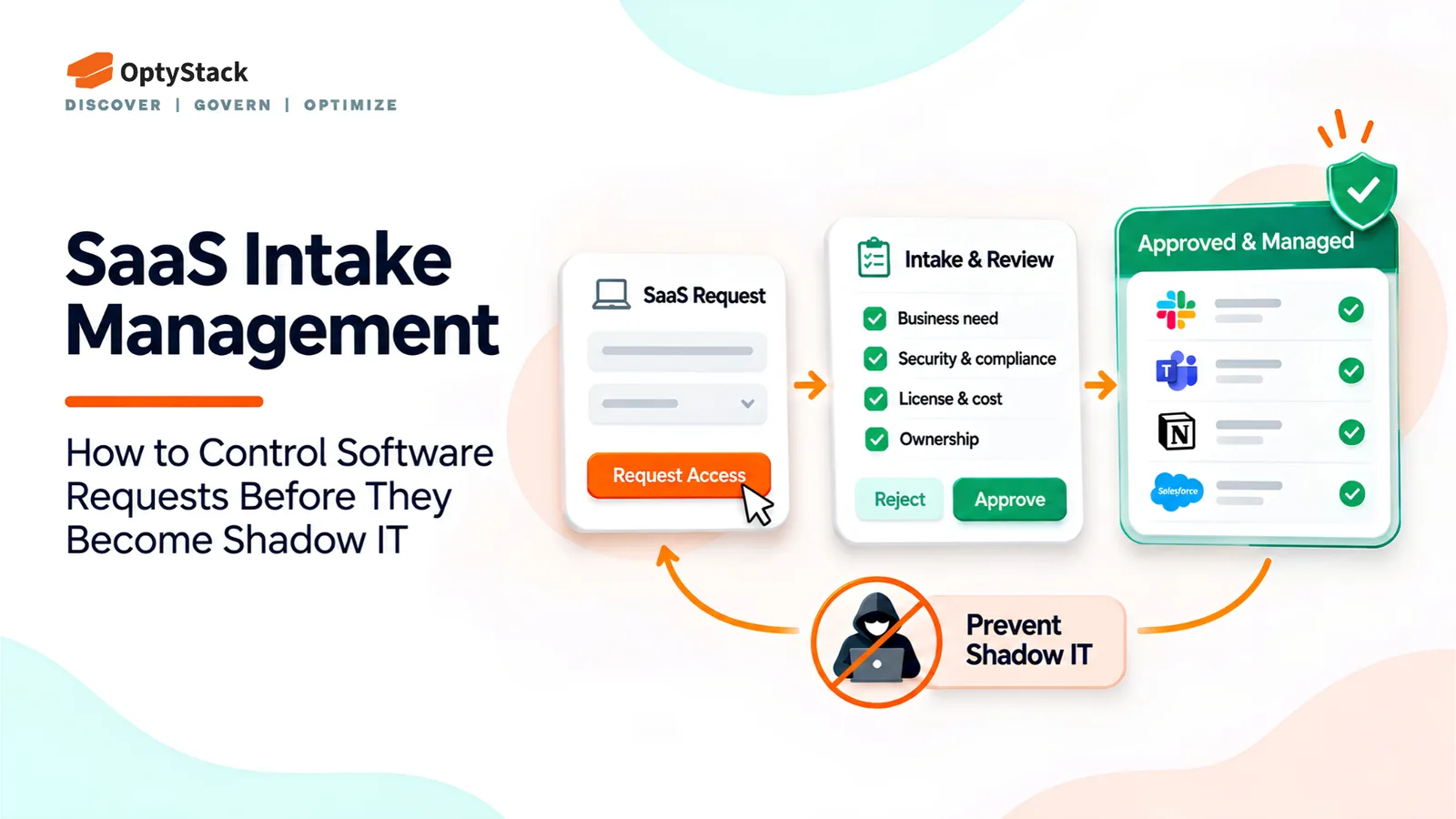
This is where SaaS intake management becomes important. A structured process gives employees a clear way to request software while helping the organization assess risks, control spending, and prevent Shadow IT before it spreads.
What Is SaaS Intake Management?
SaaS intake management is the process of receiving, evaluating, approving, and tracking requests for new software applications. It creates a consistent path between an employee's business need and the organization's decision to adopt a tool.
Rather than relying on scattered emails, chat messages, and informal approvals, companies establish a defined workflow with clear responsibilities and review criteria.
A good intake process should answer five questions:
What business problem does the software solve?
Is an approved tool already available?
What security, privacy, and compliance risks does it introduce?
What will it cost, including potential renewals?
Who will own the application after approval?
The goal is not to block every new application. It is to make informed decisions without creating unnecessary delays.
Why Traditional Software Approval Processes Fail
Many organizations already have purchasing policies, but policies alone do not guarantee visibility.
Requests arrive through different channels. Employees may contact managers, submit expense claims, or purchase subscriptions independently. Without a central intake point, IT may never see the request.
Reviews happen too late. Security teams sometimes discover an application only after employees have connected company accounts or uploaded business data.
Existing tools are overlooked. A department might purchase a new platform without knowing that another team already pays for a similar product.
Ownership is unclear. Even approved applications can become difficult to manage when nobody is responsible for access reviews, renewal decisions, or offboarding.
A centralized workflow helps address these gaps by making software requests visible before commitments are made.
How to Build a SaaS Intake Management Workflow
1. Create a single request channel
Give employees one clear place to request new software. This could be a service desk portal, an internal form, or a procurement workflow.
The process should be easy to find and simple enough that employees do not feel encouraged to bypass it. Requests received through email or chat should be redirected into the same system so they can be tracked consistently.
2. Collect the information needed to make a decision
Avoid forms that ask for unnecessary details, but capture enough information to assess the request properly.
Useful fields include:
Requester's name, department, and manager
Application name and vendor website
Business purpose and expected users
Required features and proposed alternatives
Data the application will access or store
Estimated cost, billing frequency, and contract term
Intended start date and business owner
These details help reviewers understand the actual need rather than approving a purchase based on the product name alone.
3. Route requests to the right teams
Not every request needs the same level of scrutiny. A low-risk tool that handles public information may require a simpler review than an application processing employee records or customer data.
IT can check compatibility and existing alternatives. Security can assess access controls and vendor risks. Privacy or legal teams can review sensitive data handling and contractual obligations. Finance and procurement can evaluate pricing, budgets, and purchasing terms.
Assigning clear responsibilities prevents requests from getting stuck while everyone assumes someone else is reviewing them.
4. Evaluate the request before approving the purchase
Reviewers should consider both business value and potential risk.
Ask whether the application provides capabilities that existing tools cannot meet. Compare the total cost, including user licences, add-ons, implementation, and renewal commitments. Check whether the vendor provides appropriate security documentation and contractual protections.
Microsoft's cloud risk assessment guidance emphasizes evaluating risks to data confidentiality, integrity, availability, and privacy. These principles are useful when assessing prospective SaaS vendors.
The outcome should be recorded clearly: approved, rejected, returned for more information, or approved subject to specific conditions.
5. Record the decision and plan onboarding
Approval should be the beginning of controlled adoption, not the end of the process.
Record the decision, reviewer, business owner, approved use case, expected cost, and renewal date. Where appropriate, configure single sign-on, establish access controls, and document any restrictions on data use.
If the application is rejected, explain why and suggest an approved alternative where possible. If it is approved for a limited pilot, define the review date and the criteria for deciding whether to continue.
What Should IT Check Before Approving a SaaS Application?
A practical review should cover six areas:
Security: Does the vendor provide relevant security documentation, access controls, and information about incident handling?
Privacy and data: What information will be collected, processed, or stored? Can the vendor use customer data for additional purposes?
AI features: If the application includes AI, how is submitted data handled, and can it be used to train models?
Cost and contracts: What is the total expected cost? Are there automatic renewals, minimum commitments, or cancellation restrictions?
Integration and access: Does the application connect to company systems, and what permissions will it require?
Ownership and compliance: Who will manage the application, review access, and decide whether to renew it? Are there applicable regulatory or contractual requirements?
The level of review should reflect the application's actual risk and intended use.
A Practical Example: An AI Writing Tool Request
Imagine that the marketing team requests a new AI writing assistant.
Instead of purchasing it immediately, the team submits a request explaining its intended use, expected users, and monthly cost. IT checks whether an existing approved application offers the same capabilities. Security reviews the vendor's data practices, permissions, and relevant safeguards. Finance checks the proposed spending and contract terms.
The organization might approve a limited pilot with restrictions on confidential data, assign an application owner, and schedule a review before expanding usage.
This approach gives the team a way to test useful technology while reducing the risk of uncontrolled adoption.
How SaaS Intake Management Helps Prevent Shadow IT
Shadow IT often develops when employees cannot find suitable tools through established channels or believe the approval process takes too long.
A well-designed intake workflow addresses both problems. It provides a visible route for requesting software, gives reviewers the information they need, and creates a record of approved and rejected applications.
Organizations can also monitor useful performance indicators, including average approval time, requests made outside the approved process, duplicate-tool requests, and applications without assigned owners.
Reviewing these measures helps IT identify bottlenecks and improve the process. If approvals routinely take too long, for example, the organization can simplify low-risk reviews without removing necessary security checks.
For an example of a formal government SaaS review process, the U.S. Centers for Medicare & Medicaid Services describes its Rapid Cloud Review process. Its requirements are specific to CMS, but the process illustrates how intake, security assessment, approval decisions, and ongoing monitoring can fit together.
SaaS Intake Management Checklist
Before implementing a workflow, confirm that your organization has:
A central channel for software requests
A short, standardized intake form
Defined review responsibilities and approval criteria
A risk-based process for evaluating applications
A record of decisions, costs, and application owners
A clear onboarding and renewal process
Metrics for tracking turnaround time and policy exceptions
Start with a manageable process and improve it as the number of requests and applications grows.
Conclusion
SaaS intake management helps organizations balance employee flexibility with security, governance, and financial control. By reviewing software requests before purchases happen, IT teams can identify duplicate tools, assess vendor risks, and establish ownership from the beginning.
The process works best when it is easy for employees to follow, proportionate to the risk, and connected to ongoing SaaS management. Approval is only one part of the lifecycle; organizations also need visibility into usage, licences, access, and renewals.
OptyStack helps organizations improve SaaS visibility, optimize software licences, and manage renewals. By strengthening visibility across the SaaS environment, teams can make better-informed decisions about their software investments and ongoing management.
Explore OptyStack to learn more.