SaaS SSO and Conditional Access Without a Second Directory
Sanya Pandey · October 23, 2026
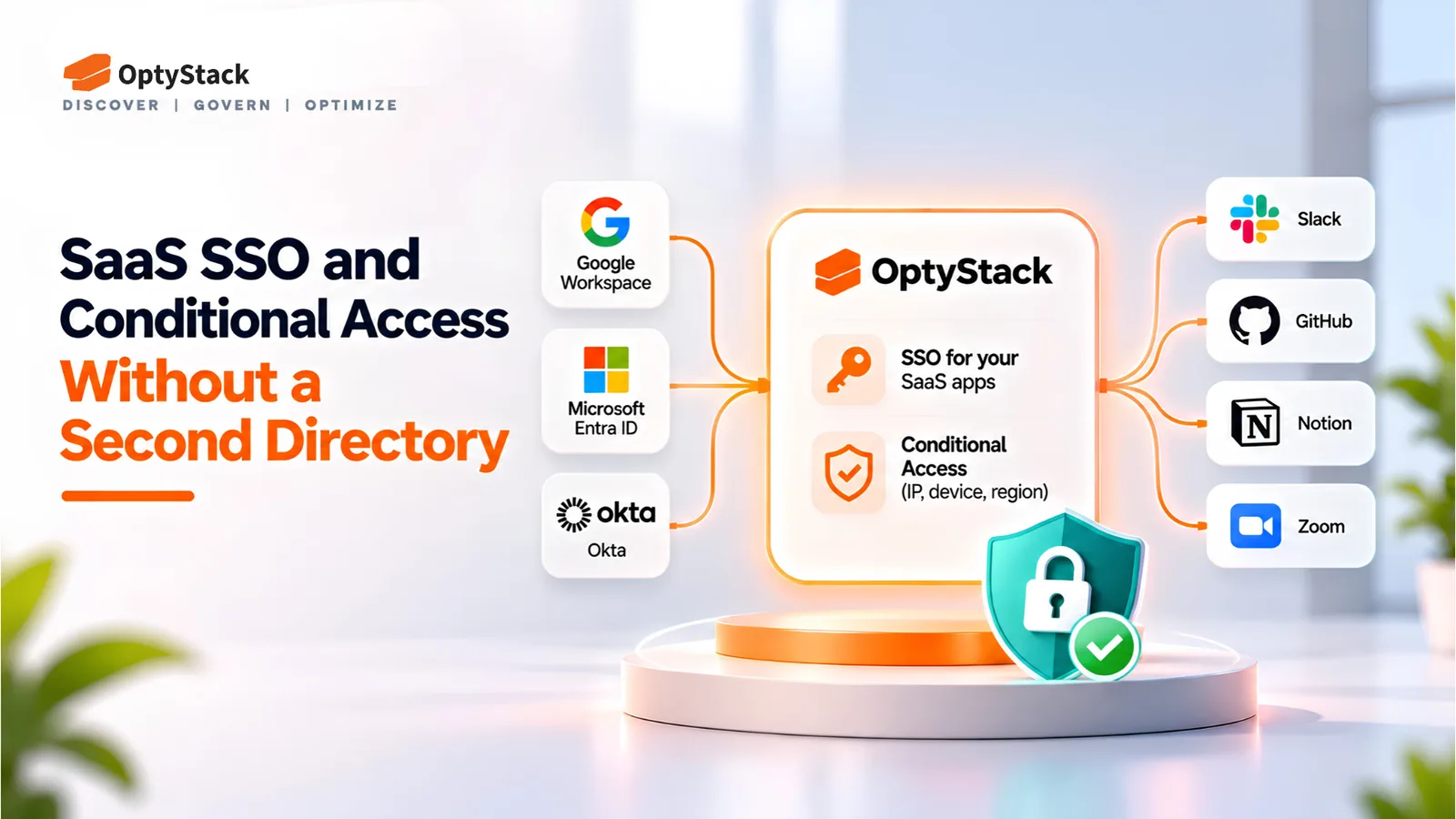
Another user directory adds one more place to manage access. OptyStack connects to the identity provider you already run, signs users in to your SaaS apps, and checks IP address, device, and region on every sign-in.
Every SaaS app has its own login, its own user list, and its own access settings. When an employee leaves, an account can stay active in a tool nobody remembers to check. A password alone can open an application from anywhere in the world. Another user directory adds one more place to manage all of this.
A better approach is to keep your existing identity provider as the source of truth and put a single sign-in and access-control layer in front of your apps. This article explains how OptyStack does that, how to connect it, and what to test before you rely on it. The product's identity management page describes the model in full.
What Single Sign-On Does for SaaS Apps
Single sign-on lets people sign in once and move to the apps they need without a separate password for each. For IT, the gain is control. Access is granted and removed from one place rather than app by app.
OptyStack imports users from Google Workspace, Microsoft, or Okta and acts as the identity provider for connected third-party apps such as Slack and GitHub. Users sign in through OptyStack, and the sign-in decision is made in one place for every connected app.
No Second Set of Identities
OptyStack does not create user accounts of its own. It imports your existing users and pushes those identities to your connected apps. Your identity provider remains the source of truth, so there is nothing to keep in sync by hand.
One Front Door to Every App
New hires get access through the provider they already use. When someone leaves the company and loses access at the source, they lose access to the apps that depend on it.
How Conditional Access Works
Single sign-on controls how people sign in. Conditional access controls whether a sign-in is allowed at all. OptyStack checks three conditions on every sign-in:
Right IP address. Sign-ins are allowed only from addresses you approve, such as your office network or VPN.
Right device. Sign-ins are allowed only from approved devices. A valid password on an unknown laptop does not get through.
Right region. Sign-ins are allowed only from the regions where your team works.
A sign-in that meets every condition continues to the app. A sign-in that fails any one of them is denied. The checks run on each sign-in, not once when the account is created.
Why IP, Device, and Region Matter
Multi-factor authentication confirms who is signing in. It does not confirm where or on what device. Conditional access adds that context. A stolen password used from an unfamiliar country on an unknown laptop should not reach a finance tool, even if the password is correct.
These three checks are the practical first layer for most SaaS apps. They work best alongside strong authentication, least-privilege permissions, and a reliable process for removing access.
How to Connect Your Identity Provider
The setup follows a short sequence. The integrations page covers the connection options in more detail.
Connect Google Workspace, Microsoft, or Okta. Link the provider and confirm the imported users match your directory.
Check the user inventory. Look for duplicate identities or missing users before you change any sign-in settings.
Choose the apps for SSO. Start with a few frequently used apps, such as Slack or GitHub.
Set your conditional access rules. Define the approved IP addresses, devices, and regions.
Test the full sign-in flow. Confirm that authorized users get in and that sign-ins failing a condition are denied.
Test with a small group before you apply the rules company-wide. Include people who work remotely, and make sure administrators have a way to recover access if a rule blocks legitimate sign-ins.
How Integrations Improve SaaS Visibility
Centralized sign-in is more useful when you can also see which apps exist, who uses them, and what they cost. OptyStack's integrations connect your identity provider, productivity suite, and finance systems into one view of your stack, matching users, groups, and apps across sources so one application does not appear under three names.
That view answers practical questions. Which apps should move to SSO first? Which accounts belong to people who have left? Which paid tools are rarely used?
The same data supports shadow IT discovery and license management. An unfamiliar app that appears in sign-in activity can be reviewed before it becomes a problem, and an unused seat can be reclaimed.
A Simple Rollout
A phased rollout reduces the risk of disrupting employees or locking out administrators:
Week one: Connect the identity provider and review the imported users.
Week two: Set up SSO for two or three high-use apps and test with a small group.
Week three: Apply conditional access rules to the pilot apps and test approved and unapproved sign-ins.
Week four: Expand in stages and document who owns each policy and how access is removed when people leave.
What to Confirm Before You Enforce
Before you rely on the setup for critical applications, confirm these points with the OptyStack team and test them in your environment:
Whether suspending a user at the identity provider blocks new sign-ins through OptyStack right away.
Whether existing sessions and application tokens are revoked automatically.
How approved devices are identified, and whether endpoint software is required.
Which applications and identity providers are supported for your setup.
How administrators recover access if a rule blocks legitimate users.
Checking these up front prevents surprises between the policy you intend and the behavior you see in production.
One Front Door, One Set of Rules
SSO and conditional access work best when sign-in, inventory, and spend are managed together. OptyStack brings your existing identities into one sign-in path, applies the same conditions to every connected app, and keeps the inventory current from the same integrations.
The result is easy to explain to an auditor or a new hire. There is one place to sign in, one set of rules for where sign-ins can come from, and one list of the apps you pay for.
You can review the identity management features, compare pricing plans, or start a free trial.
Sources
OptyStack, SSO and Conditional Access for SaaS
OptyStack, SaaS App Integrations
OptyStack, Shadow IT Discovery
OptyStack, License Management
OptyStack, Pricing