Per-Employee AI Budgets: Control ChatGPT, Claude and Cursor Costs Without Blocking Adoption
Aryan Malik · October 20, 2026
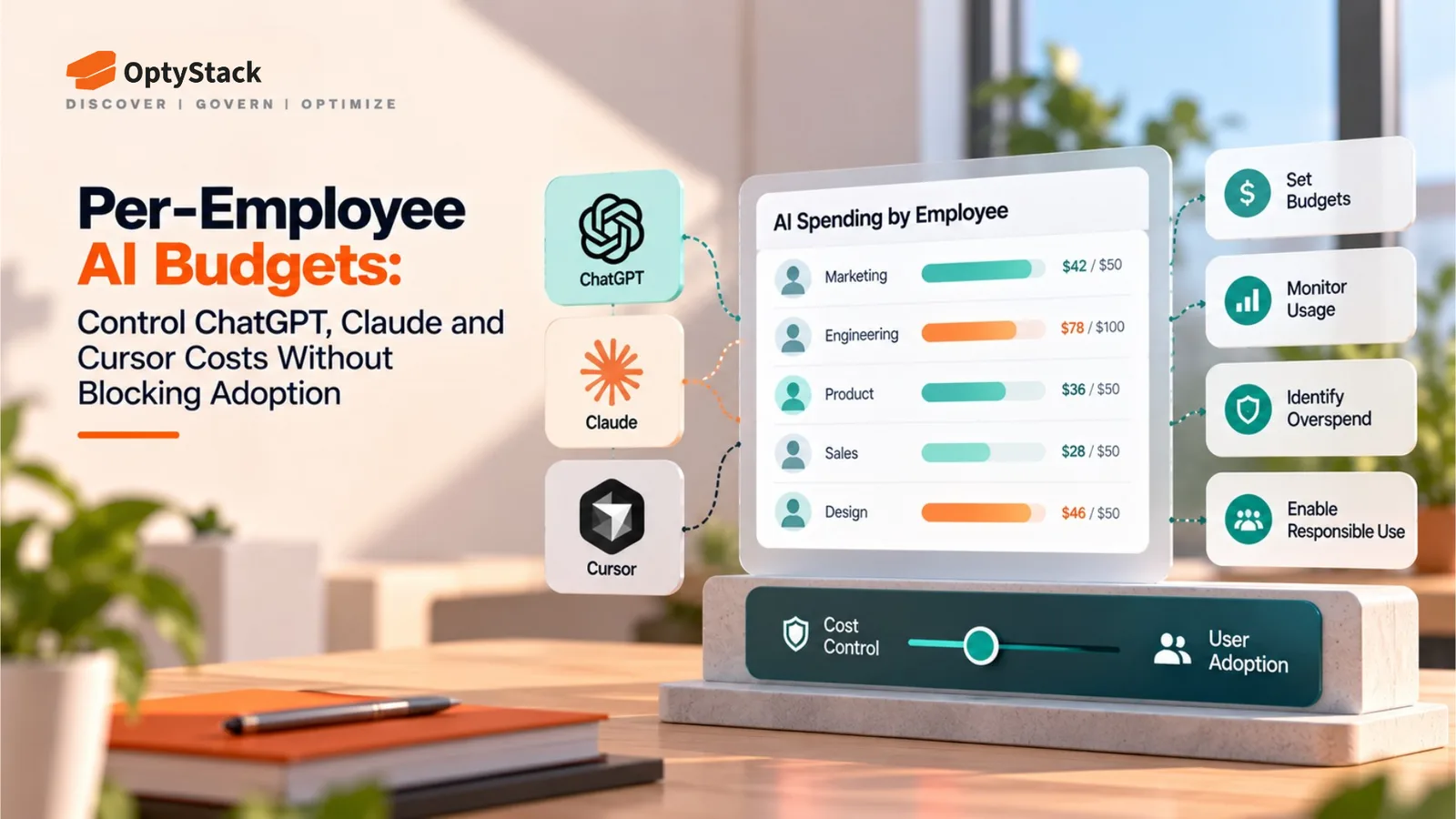
AI bills can be difficult to forecast, but blanket bans can slow productive teams down. Learn how to build per-employee AI budgets with baseline allocations, shared usage pools, spending alerts and provider-level controls.
AI tools can make employees more productive, but their costs are becoming harder to predict. One employee may stay within a standard subscription, while another runs intensive coding agents, processes large datasets or uses additional paid credits. When finance reviews the invoice, the difference between expected and actual spending can be significant.
A blanket ban on AI tools is rarely the best response. It can slow down productive teams and encourage employees to use personal accounts that IT cannot easily monitor.
A better approach is to give employees a reasonable baseline, establish additional budgets for heavier workloads and create clear rules for what happens when spending approaches its limit. The objective is to control costs without discouraging legitimate AI use.
Why AI Bills Surprise Finance Teams
Traditional software subscriptions are often easier to forecast because the organization pays a fixed amount per seat. AI tools can be more complicated. Depending on the product and plan, costs may involve subscriptions, usage allowances, additional credits, API consumption or usage-based charges.
A developer using an AI coding assistant for a few short tasks may consume very different resources from someone running multiple agents on a large codebase. Similarly, a team using AI to summarize documents may have a different cost profile from one processing thousands of records through an API.
Pax8's Q3 2026 SMB AI Pulse Report, released on October 12, 2026, found that 49% of small and midsized businesses that paid for AI in the previous year received at least one bill or usage charge higher than expected. The finding illustrates why AI budgeting needs to account for actual usage rather than relying solely on subscription prices.
Read the official Pax8 report announcement.
The underlying problem is visibility. If finance sees consumption only after an invoice arrives, it has limited opportunity to adjust budgets before costs accumulate.
Soft Limits vs. Hard Caps: Know the Difference
Before setting employee budgets, distinguish between a financial warning and a control that actually restricts spending.
Soft limits: Warn before spending gets too high
A soft limit triggers an alert or review when usage approaches a threshold. For example, an employee might receive a notification when they have consumed 70% of their monthly allowance.
The team can then investigate whether the additional usage is justified, move a workload to a more economical model or request approval for a temporary increase.
Soft limits preserve flexibility, but an alert alone does not prevent additional charges. Someone must respond to it, or the system must trigger a separate action.
Hard caps: Restrict additional spending
A hard cap limits additional usage or spending after a defined threshold is reached, provided the underlying product or billing system supports that control.
The restriction might apply to an individual user, an API organization or a shared team account. Those are not interchangeable.
A hard cap offers stronger cost protection, but it can interrupt important work if the limit is too restrictive. Before enabling one, establish who can approve an exception and how urgent work will continue.
Which approach should you use?
For most teams, a combination works better than relying on either approach alone.
Use soft limits for normal usage and early warnings.
Use hard caps where the billing system supports them and uncontrolled consumption presents a material risk.
Create an exception process for approved projects and temporary workload spikes.
Review the effect of restrictions on productivity so that cost savings do not come at the expense of useful work.
The important distinction is that a budget policy defines what an employee should spend. A technical control determines whether the system can actually prevent spending beyond that amount.
Step Zero: Inventory Every AI Tool
Before assigning budgets, finance needs a reliable inventory of the AI applications the organization uses.
Include tools purchased through IT, subscriptions paid for with company cards, employee purchases reimbursed through expenses, API accounts and free-tier applications that may have been upgraded. Where permitted and available, review identity, billing and usage signals to identify tools missing from the approved inventory.
For each application, record:
Application and provider: Which AI tool is being used?
Owner: Which employee or team is accountable for it?
Payment model: Is it a fixed subscription, a usage-based service or a combination?
Business purpose: What work does it support?
Budget and renewal: What is the approved allocation, and when is the next renewal?
Available usage data: Can the organization measure consumption, active seats or additional charges?
This inventory can reveal duplicate subscriptions, unused seats and separate accounts that provide overlapping functionality.
It also prevents an important budgeting mistake: setting limits only on the applications finance already knows about while leaving other spending outside the process.
A Practical Per-Employee AI Budget Model
A useful budget combines an individual baseline with a shared pool for legitimate spikes in demand. The following example illustrates how the model can work; these amounts are hypothetical and are not industry benchmarks.
Imagine a company with 20 employees who regularly use AI tools.
Budget component | Illustrative monthly allocation |
|---|---|
Individual baseline: $25 × 20 employees | $500 |
Shared project and overflow pool | $400 |
Total planned AI budget | $900 |
Early-warning threshold: 70% of total budget | $630 |
Each employee receives a baseline allocation for ordinary work. The shared pool covers approved projects that require more usage, such as a large code migration, a research project or a temporary increase in document processing.
When total spending reaches $630, finance receives an alert. The team checks which applications and workloads are driving the increase, whether the spending is expected and how much budget remains for the rest of the month.
If spending approaches the $900 allocation, the company can pause discretionary purchases, require approval for additional usage or enforce available technical caps.
The $900 budget is not automatically a hard cap. If the company's billing systems cannot enforce that limit, finance must use the available provider controls and approval processes to manage additional spending.
The model should be adjusted using actual consumption data. After two or three review cycles, finance can identify which roles need higher baselines and whether the shared pool is large enough.
Four Rules for a Budget That Employees Can Actually Use
1. Set a baseline by role, not just headcount
Employees have different workloads. A developer using coding agents throughout the day may need more capacity than someone using AI occasionally for drafting or summarization.
Start with a reasonable allocation, then adjust it based on observed usage, business requirements and the cost of the work being performed. Avoid assigning a larger budget simply because someone has a senior title.
The aim is to fund legitimate work without giving every employee the same allowance regardless of need.
2. Keep a shared pool for approved projects
Some work naturally creates temporary spikes in consumption. Requiring a permanent increase to an employee's monthly allocation for a one-time project can distort the budget.
A shared pool gives teams flexibility while retaining financial oversight. Define who can approve additional usage, what evidence is needed and when the project allocation expires.
Where the provider supports pooled usage, configure it there. Otherwise, manage the pool as an internal financial allocation and monitor actual charges separately.
3. Match the control to the provider's billing model
ChatGPT, Claude and Cursor do not necessarily measure or restrict usage in the same way. Subscription allowances, additional credits, API charges and organizational spending controls can differ by plan.
For example, OpenAI's billing documentation distinguishes ChatGPT billing from API billing. Anthropic's documentation provides plan-specific guidance for Claude, while Cursor's pricing and usage documentation explains its usage allowances and additional usage controls.
Finance should review the actual plan, billing account and available controls for each service. Do not assume that a subscription limit automatically caps API spending, or that a personal account offers the same administrative controls as a team plan.
4. Review spending every month
A monthly review should answer four questions:
Which teams spent more or less than their allocation?
Which applications generated the largest additional charges?
Which paid seats or subscriptions saw little or no use?
Do any employees or projects need a different allocation next month?
Track total spending, cost per active user, usage against budget and the number of exceptions approved. Where detailed usage data is available, compare it with the business outcomes the tool supports.
The purpose is not to penalize employees for using AI. It is to identify waste, forecast spending more accurately and direct budget toward the work that delivers value.
Offboarding: Remove Access and Reclaim Unused Licenses
Employee departures create another opportunity to control costs. When someone leaves, review their assigned AI seats, subscriptions, API credentials and automated workflows.
Remove or reassign paid seats according to the provider's billing rules. Revoke applicable credentials and tokens, and verify that scheduled jobs or integrations no longer depend on the departing employee's account.
Not every AI service uses an individual API key, and removing a seat does not necessarily revoke every existing credential. The offboarding checklist should reflect the access mechanisms each application actually uses.
Also check whether unused licenses can be reclaimed immediately or only at the next renewal. Record the savings so finance can measure the effect of the policy over time.
Where OptyStack Fits
OptyStack helps IT and finance teams bring SaaS application discovery, available spend information and renewal tracking into one place. Its application inventory can help identify AI tools that may otherwise remain outside the approved software list, while ownership and spend visibility support follow-up decisions.
That visibility is a useful starting point for AI budgeting. Before assigning limits, teams need to know which applications are in use, who is responsible for them and what subscription or spending commitments exist.
OptyStack should not be treated as an automatic enforcement layer for every AI provider's token usage or API spending. Actual spending caps must be configured through the relevant provider or billing system where supported. Detailed consumption data may also require separate provider integrations.
You can review OptyStack's product capabilities and pricing to see which application discovery and spend-management features fit your environment.
Final Thoughts
Per-employee AI budgets work best when they provide flexibility within clear financial boundaries. Give employees a reasonable baseline, reserve a shared pool for approved projects, alert finance before spending becomes excessive and enforce hard caps wherever the underlying billing system supports them.
Start with an accurate inventory, measure actual usage and review allocations monthly. If a team repeatedly exceeds its budget for valuable work, adjust the allocation or investigate more economical options rather than imposing a blanket restriction.
The objective is straightforward: make AI spending visible, predictable and accountable without preventing employees from using tools that help them do their jobs.