How to Calculate Your True SaaS Spend
Aryan Malik · August 27, 2026
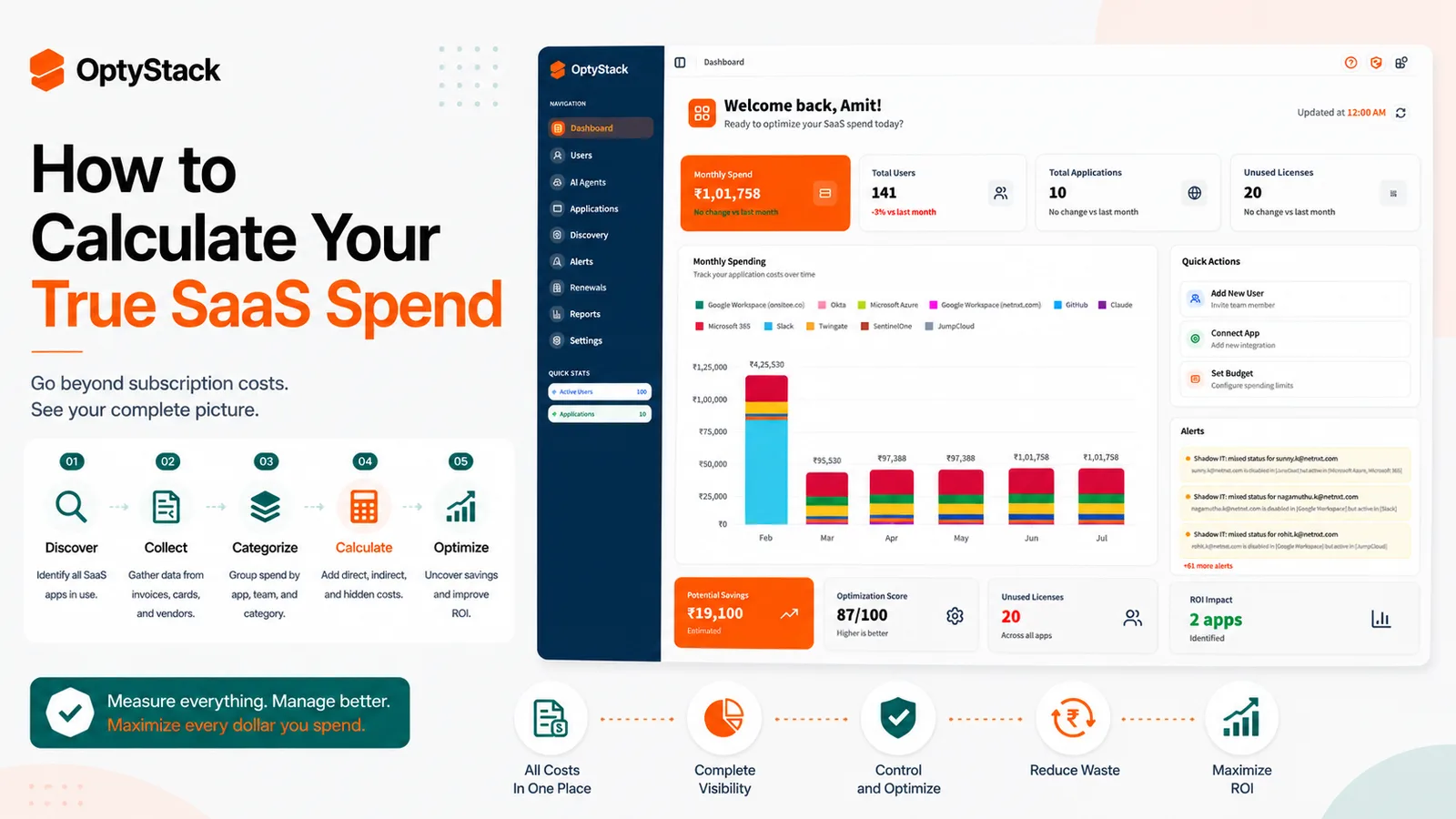
Your SaaS budget rarely shows the whole picture. Learn how to calculate true SaaS spend across subscriptions, corporate cards, employee expenses, usage-based charges, and hidden software—and turn that baseline into actionable savings.
Most companies can tell you what they budgeted for SaaS. Far fewer can tell you what they actually spend.
The number in Finance's software budget is only part of the picture. There are subscriptions paid through procurement, software charged to corporate cards, expenses submitted by employees, free trials that became paid plans, tools sitting inside larger vendor contracts, and applications nobody in IT knows about at all.
Add those together and the real SaaS bill can look very different from the number on the budget spreadsheet.
Zylo's 2026 SaaS Management Index puts average annual SaaS spend at $55.7 million across organizations in its benchmark, while the average portfolio contains 305 applications. The exact numbers vary enormously by company size, but the underlying problem is the same: software spend is increasingly spread across teams, vendors, contracts, and purchasing channels.
If you want to control SaaS costs, the first step is knowing what the company is actually paying.
What “true SaaS spend” really means
True SaaS spend is the total cost of the software the business uses or pays for, regardless of where the purchase originated.
That includes more than recurring subscription invoices.
A realistic calculation can include:
subscriptions paid through Procurement
corporate card purchases
employee expense reimbursements
annual contracts paid upfront
usage-based or consumption charges
add-ons and premium features
implementation or platform fees
software bundled into larger vendor agreements
duplicate applications used by different teams
The point isn't to create a complicated accounting exercise. It's to stop treating each payment channel as a separate version of reality.
A company might think it spends $800,000 on SaaS because that's what appears in its procurement system. If another $150,000 is sitting in expenses and card transactions, the actual number is already $950,000.
Why SaaS spend is harder to calculate than it looks
Software gets purchased in too many places
Traditional procurement data is useful, but it isn't the whole picture.
Employees can buy software with corporate cards. Teams can expense subscriptions later. Free trials can convert into paid plans without appearing in the original software request. Some tools are included as part of broader contracts and never appear as a separate SaaS line item.
Zylo's 2026 research reflects how decentralized SaaS purchasing has become, with business units controlling a large share of SaaS applications and spend rather than IT acting as the sole buyer.
That means Finance and IT need to reconcile multiple sources if they want a reliable spend number.
The vendor name on a statement may not tell you what was purchased
A billing statement might show a parent company, payment processor, or abbreviated vendor name rather than the product employees actually use.
That creates another problem when someone tries to calculate spend manually.
Before adding a line item to your SaaS total, you need to know what application it represents, which department uses it, whether it is part of a larger contract, and whether there are other charges from the same vendor elsewhere.
Usage and spend are two different things
A company can accurately calculate what it pays and still have no idea whether the money is being used effectively.
Imagine two applications that each cost $50,000 a year.
One is used every day by 200 employees.
The other has 200 purchased seats but only 70 active users.
The spend is easy to record. The second application's optimization opportunity is much harder to see without usage data.
How to calculate your true SaaS spend
Step 1: Start with every source of payment data
Pull twelve months of records from:
procurement and purchasing systems
accounts payable
corporate cards
expense management platforms
vendor invoices
finance or ERP systems
known software contracts
Don't start by trying to classify everything perfectly. First, build the raw list.
You're trying to answer one question:
What software-related payments actually left the company?
Step 2: Normalize the vendor and application names
Clean up duplicate vendor names before calculating totals.
For example, the same product might appear under a legal entity in one system, a payment processor in another, and a product name in an expense report.
Normalize those records into a consistent format:
Vendor → Application → Department → Payment source → Amount
This prevents the same subscription from being counted twice and makes later analysis much easier.
Step 3: Separate recurring and variable costs
Not every SaaS bill behaves like a fixed subscription.
Separate:
Recurring subscription costs: monthly or annual plans.
Usage-based costs: API calls, storage, compute, seats above a threshold, or other consumption charges.
One-time costs: implementation, migration, setup, or professional services.
Add-ons: premium modules, AI features, extra storage, or other upgrades.
This matters because a $100,000 annual contract and a $50,000 contract with another $50,000 of unpredictable consumption aren't the same budgeting problem.
Step 4: Add spend that doesn't appear in Procurement
This is where a lot of “true spend” calculations fall apart.
Look specifically for:
employee-expensed subscriptions
software bought through corporate cards
free trials that converted to paid plans
applications purchased by individual departments
AI tools paid for outside the normal process
tools bundled into larger agreements
OptyStack's discovery approach combines spend, SSO, and browser telemetry to help identify software purchased outside the normal procurement path and build a broader software footprint.
Step 5: Map spend to the applications actually being used
Once you've found the payments, connect them to the software and the people using it.
For each application, record:
annual cost, department, owner, active users, assigned licenses, renewal date, and payment source.
This turns a finance list into a usable SaaS inventory.
It also reveals something an expense report cannot: whether the company is paying for software that nobody is using, paying twice for overlapping tools, or carrying more seats than the business needs.
Step 6: Calculate gross spend before calculating savings
Don't subtract expected savings too early.
First establish the gross SaaS spend.
For example:
Procurement subscriptions: $600,000
Corporate cards: $120,000
Employee expenses: $80,000
Usage-based charges: $100,000
Other software charges: $50,000
True annual SaaS spend: $950,000
Only after you establish that baseline should you start calculating savings opportunities.
That keeps your reporting honest. “We can save $150,000” means much more when leadership knows the company currently spends $950,000.
What your true SaaS spend can tell you
Once the baseline is correct, the number becomes more useful than a budget figure.
Find where the money is concentrated
Which applications account for most of the spend?
A company may discover that a relatively small number of contracts make up most of the software budget. Those should usually receive more attention during renewal and negotiation than dozens of low-cost subscriptions.
Find spend that has no clear owner
Every significant application should have someone who can explain why it exists, who uses it, and what should happen at renewal.
Unknown ownership is often a sign that the spend isn't being actively managed.
Find duplicate and overlapping software
Two applications can have completely separate vendor contracts while serving nearly the same function.
Mapping spend by category can reveal where the business is paying multiple times for overlapping capabilities.
Find the gap between spend and usage
This is where optimization starts.
A $75,000 application with strong adoption may be worth every dollar.
A $75,000 application with weak usage deserves a closer look, even if the contract was perfectly negotiated.
The point of calculating true spend isn't simply to produce a bigger number. It's to connect money, software, ownership, and actual usage.
Where OptyStack Fits
Calculating true SaaS spend manually means pulling information from multiple systems and trying to reconcile it into one reliable picture.
OptyStack brings spend, identity, usage, and application information together so teams can see where software spend is coming from and what sits behind each line item. Its platform is designed to identify unmanaged applications, duplicate tools, unused licenses, and other sources of hidden SaaS spend.
That gives Finance, IT, Procurement, and SaaS owners a shared view of the software estate instead of four different spreadsheets telling slightly different stories.
The result is a more useful number: not just “What did we spend?”, but “What are we paying for, who is using it, and where should we act?”
OptyStack is free to start and doesn't require a credit card.
See your real SaaS spend in one place. Start free with OptyStack.
Frequently asked questions
What is true SaaS spend?
True SaaS spend is the total cost a company pays for SaaS applications across all purchasing channels, including Procurement, corporate cards, employee expenses, contracts, usage-based charges, and other software-related payments.
Why is SaaS spend difficult to calculate?
Because software purchases are often spread across departments, payment methods, vendors, and contracts. Procurement data alone may miss employee purchases, expense-based software, and applications acquired outside the normal process.
Should usage-based SaaS costs be included?
Yes. If the company pays for them, they belong in the true SaaS spend calculation. They should be tracked separately from fixed subscription costs because their totals can change with usage.
How often should true SaaS spend be calculated?
Maintain the underlying data continuously where possible, but at minimum reconcile the full SaaS spend baseline quarterly. Higher-growth companies or organizations with significant usage-based pricing may benefit from more frequent monitoring.
What should companies do after calculating true SaaS spend?
Break the total down by application, department, owner, usage, contract, and payment source. Then identify unused licenses, duplicate applications, oversized contracts, upcoming renewals, and spend with no clear owner.
Your SaaS Budget Is Only Useful If the Number Is Real
The hardest part of SaaS cost control isn't deciding what to cut.
It's knowing what you're paying for in the first place.
A complete SaaS spend calculation brings together the payments that Procurement sees, the subscriptions Finance sees, the expenses employees submit, and the software IT discovers elsewhere.
Once those pieces are connected, the questions get much easier to answer: which applications are worth keeping, which contracts need attention, where duplicate spend exists, and how much of the software budget is actually being used.
Start free with OptyStack and see what your SaaS spend really looks like.