How to Offboard an Employee's AI Agents: A Checklist for IT Teams
Anuj Bansal · October 30, 2026
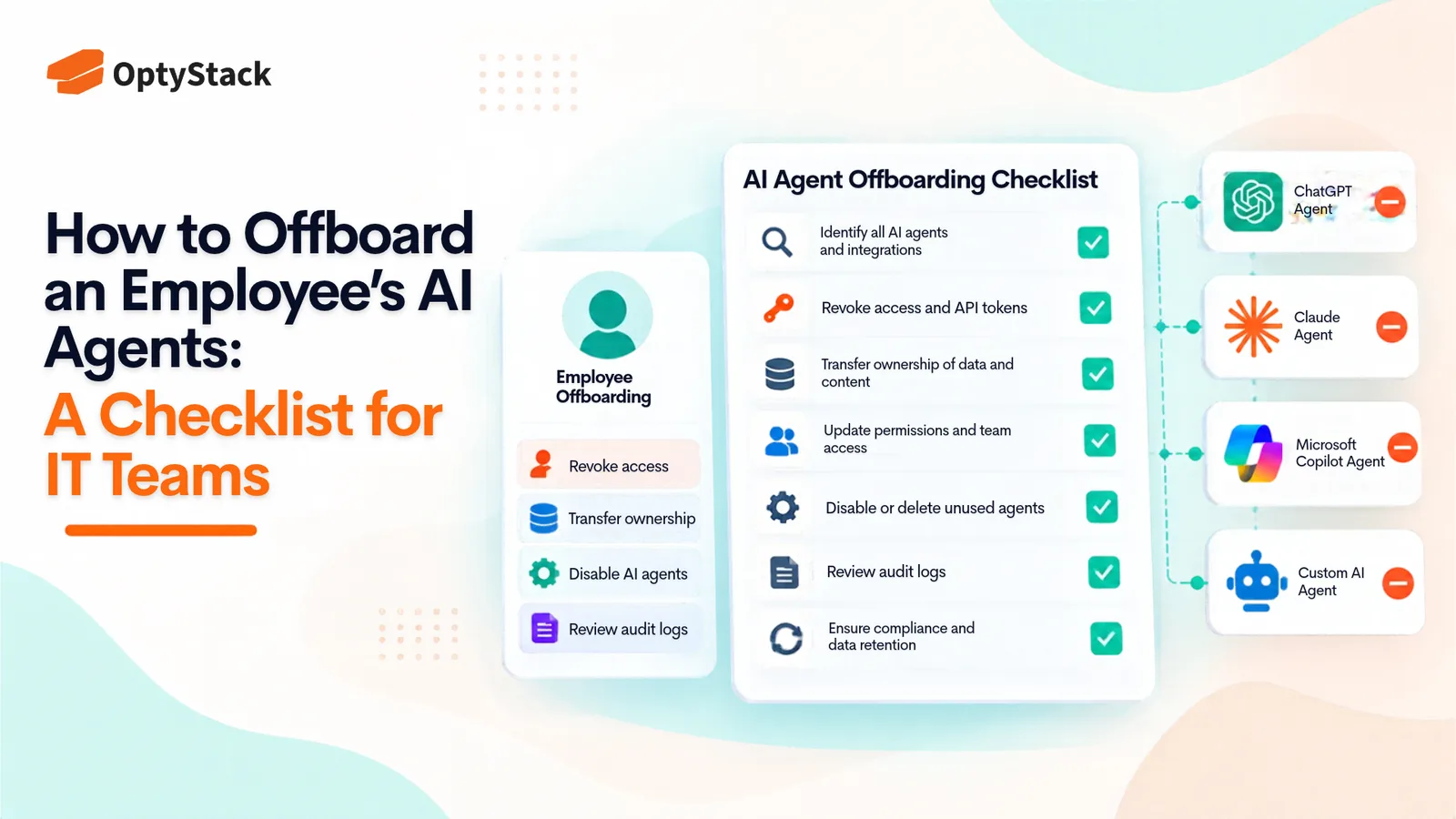
Employees leave, but the AI agents they created and connected can keep running with active credentials. This checklist helps IT teams find every agent, OAuth grant, and API key tied to a departing employee, reassign or retire it, revoke access, and reclaim unused licenses.
When an employee leaves, IT usually disables their accounts and collects their laptop. That process was designed for people. It does not reliably catch the AI agents those people created, connected, or left running.
In its article, Offboarding Humans, Leaving Zombies: The New Workforce Risk, JumpCloud describes these systems as "Zombie Agents": autonomous systems that outlive the employees who created them.
An agent might retain an OAuth authorization to a productivity suite, use an API key stored in a script, or run through a service account that nobody remembers creating.
Disabling the employee's account does not necessarily disable these agents or revoke every credential they use.
The risk is straightforward: systems can continue accessing company resources without a clear owner or someone responsible for their activity.
The solution is to include AI agents, their credentials, and their connected applications in the standard employee offboarding process. Here are four steps IT teams can follow.
Why AI Agents Outlive Their Creators
Agents often persist for ordinary operational reasons. A developer builds an automation to save time, and it continues running after the project ends. A team connects an AI assistant to a shared drive, and the connection remains active after the person who approved it leaves. A script stores a personal access token that nobody remembers to revoke.
The result is access without clear ownership.
Traditional identity systems primarily track human accounts. They do not necessarily provide a complete inventory of every agent, API key, OAuth authorization, or service account created by an employee.
Microsoft's emergency access revocation guidance highlights a related problem: disabling a user and revoking refresh tokens does not automatically terminate every application-issued session. Applications may maintain their own session cookies and access policies.
AI agents introduce another layer because they can operate through credentials that are separate from the employee's primary account.
This makes agent discovery and deprovisioning an important part of employee offboarding.
Step 1: Find Every Agent, OAuth Grant, and API Key Tied to the Leaver
Start by identifying everything the departing employee could have created, connected, or administered. Look in four places.
OAuth grants and connected applications
Check the employee's account in your identity provider and productivity platforms for third-party applications they authorized. Look for AI assistants, browser extensions, and integrations with access to email, files, calendars, or internal systems.
Record the permissions each connection holds and the resources it can access.
API keys and access tokens
Review credentials issued to the employee and any shared credentials they managed. Check code repositories, environment variables, CI/CD pipelines, and secrets-management systems for API keys or personal access tokens associated with their projects.
Pay particular attention to credentials embedded in scripts or automated workflows.
AI agents and automations
Ask the employee's manager and team to identify agents, bots, scheduled tasks, and AI workflows the employee created or maintained.
Check integrations within SaaS platforms and identify which accounts, permissions, and credentials those workflows use.
Card-paid and personal-account tools
Review expense reports and company card transactions for AI subscriptions registered under the employee's name. These tools may not appear in the approved application inventory or identity provider.
Record each finding with its application, purpose, owner, permissions, credentials, connected systems, and last known activity.
An item with no identifiable owner or business purpose should be flagged for investigation before the offboarding ticket is closed.
Step 2: Reassign or Retire Each Agent and Review Its Credentials
Every identified agent needs a documented outcome: reassignment or retirement. No agent should continue operating without an accountable owner.
Reassign agents that still provide business value.
Identify a suitable replacement from the employee's team. Confirm that the new owner understands what the agent does, which systems it accesses, and what responsibilities come with maintaining it.
Review the agent's permissions against the new owner's requirements. Move credentials into an approved secrets-management system rather than leaving them attached to an individual's personal account.
Retire agents that are no longer required.
Stop scheduled executions, disable associated integrations, and remove the agent from workflows that depend on it. Document its purpose and dependencies before shutting it down so that other business processes are not disrupted.
Review and rotate credentials.
Do not assume that every credential is compromised simply because its creator has left. Instead, assess ownership, storage, access history, and potential exposure.
Rotate credentials when ownership changes, exposure is suspected, or the existing access arrangement is no longer appropriate. Generate replacements, update dependent systems, verify that the new credentials work, and revoke the old ones.
Revoke credentials that are no longer needed.
This process should cover API keys, OAuth authorizations, personal access tokens, and service-account credentials. Rotating one API key does not automatically revoke the other credentials associated with an agent.
Step 3: Revoke Sessions and Application Access, Including Non-SSO Apps
Disabling an employee's identity account is the beginning of access revocation, not necessarily the end.
Microsoft's Revoke User Access in an Emergency documentation explains that blocking new sign-ins and revoking refresh tokens does not automatically invalidate every existing session.
For example, Microsoft Entra ID can revoke its own refresh tokens, but applications may issue independent session cookies that require separate revocation through the application.
Work through the following sequence:
Disable the employee's account. Block new sign-ins through your identity provider.
Revoke sign-in sessions and refresh tokens. In Microsoft Entra ID, use the Revoke sessions action on the user's overview page, or the equivalent in your identity provider.
Review registered devices. Disable or remove registered devices where your security policy and administrative permissions allow.
Deprovision connected applications. For applications using SCIM or automated provisioning, verify that the employee's account is suspended or removed. Do not assume every application immediately terminates existing sessions.
Revoke application-specific sessions. Contact the relevant application or use its administrative console to terminate sessions and revoke access where required.
Handle non-SSO applications manually. Applications with local passwords, independent authentication, or separate login systems may not respond to identity-provider changes. Remove the employee's account and document the action.
Separately revoke the credentials used by the employee's agents. OAuth grants, API keys, personal access tokens, and service-account credentials may remain valid even after the employee's identity sessions have been revoked.
Treat agent credentials as a separate revocation task, not something automatically handled by disabling the employee's account.
Maintain a record of federated and non-federated applications. This makes it easier to identify which systems require manual intervention during future departures.
Step 4: Reclaim Paid AI Seats and Credits
Employee offboarding also creates a software cost management task.
An employee's AI subscription, assigned license, or team seat may continue generating costs if nobody reviews it after departure.
Compare the employee's application inventory with license assignments in each vendor's administrative console.
For every subscription, check:
Whether the license is assigned to the departing employee.
Whether the account can be reassigned to another employee.
Whether the subscription can be downgraded or cancelled.
Whether unused credits expire, roll over, or remain attached to the account.
Whether the vendor charges immediately or at the next billing cycle after a seat is removed.
Do not assume that removing a license immediately stops billing. Contract terms and vendor billing policies determine when the change affects actual charges.
For usage-based services, check whether credits can be transferred or returned to a shared pool. If they cannot, document their expiry and remaining value.
Look for the same pattern across other departures. A single unreclaimed license might seem insignificant, but repeated missed reclamations can create substantial waste across the organization.
Optystack helps teams connect applications with the people who use them, identify unused licenses, and manage software access throughout the employee lifecycle. Its license optimization capabilities include idle-seat reclamation, while its user lifecycle capabilities support provisioning and deprovisioning.
For contract timing and upcoming renewal decisions, explore Optystack's contract renewal tracking.
Confirm that the relevant integrations and workflows support your specific applications before relying on automated offboarding.
Make AI Agent Offboarding Part of Every Employee Departure
AI agent offboarding should not be a separate security project that IT remembers to run occasionally. It should become a standard part of the employee exit workflow.
Add specific checks for agents, API keys, OAuth authorizations, connected applications, and paid AI subscriptions to every offboarding ticket.
Require the departing employee's manager and the relevant application owners to confirm which agents need reassignment and which should be retired. Have IT and security verify that associated credentials and sessions have been revoked, and involve finance or procurement to confirm that unnecessary subscriptions have been reclaimed.
Test the process on an upcoming employee departure and review any missed connections or credentials before making it part of the standard procedure.
The objective is simple: when an employee leaves, nothing they created or connected should continue operating without a clear owner, an approved purpose, and the right level of access.
With a repeatable offboarding process, IT teams can reduce lingering access, improve accountability, and prevent unnecessary software spending.